Save Editor (Project CyberCAT-SimpleGUI)
Cyberpunk 2077 — Mods & Enhancements
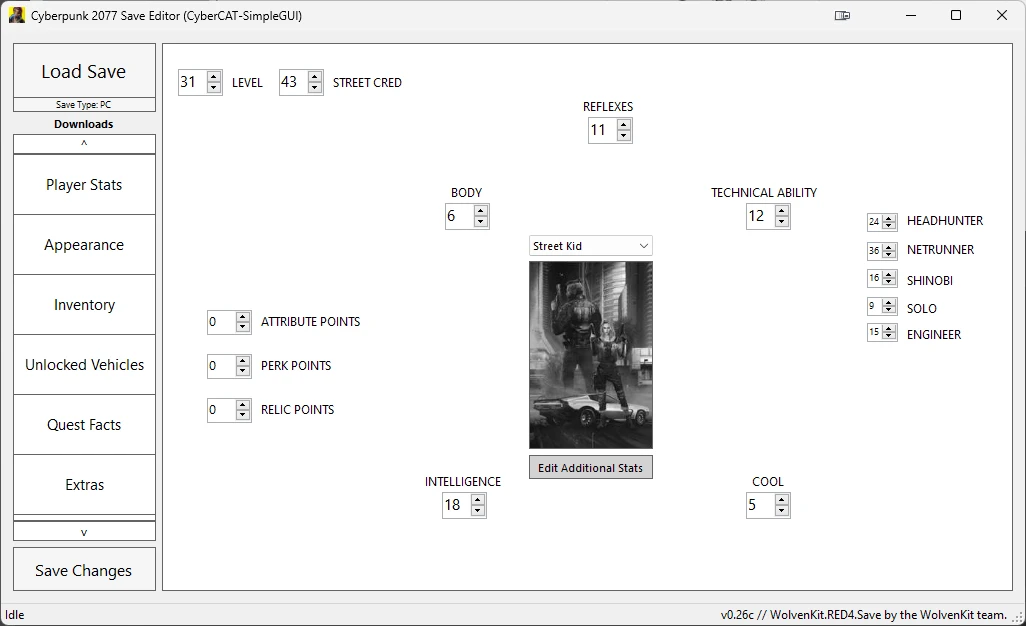
Project CyberCAT-SimpleGUI is a standalone Windows GUI wrapper around the underlying CyberCAT save editor library, letting you inspect and modify nearly every field in your Cyberpunk 2077 save files without needing to edit raw JSON. Unlike the older Save Editor (by pixelboost), this tool gives you a visual tree of your V's stats, inventory, quest states, and even lifepath flags, allowing you to fix broken quests, add missing items, or alter attribute/perk values directly. Players install it to recover from softlocks, duplicate legendary gear, or test builds by tweaking skill progression and cyberware capacity without starting a new game.
📦 Full mod page on discovermods
Downloads, ratings, compatibility info, installation guides, and user reviews.
View on discovermods →Syntax
UtilitiesExample
Downloads: 2,230,437 | Endorsements: 42,957💡 Notes
By DeweySalt and Papayu | v0.28b | 42,957 endorsements
🎯 Tips & Tricks
Navigate to %USERPROFILE%\Saved Games\CD Projekt Red\Cyberpunk 2077\savegames\ and copy the entire folder of the slot you're editing (e.g., 'savegames\manual_001'). Paste it elsewhere as a .zip backup. CyberCAT-SimpleGUI writes directly to the .sav file, and a single misclick can corrupt your playthrough—restoring from backup is the only fix.
Open CyberCAT-SimpleGUI, load your save, go to the 'Quest Facts' tab, and search for the specific fact ID like 'q112_johnny_met' or 'sq020_roach_race_done'. You can set the value to 1 or 0 to force-advance or reset a quest step. For example, if 'Automatic Love' won't trigger, set 'q110_braindance_done' to 1 and reload the game.
In the 'Inventory' tab, click 'Add Item' and paste a known item TweakDB ID like 'Items.Preset_Jacket_01_Old' or 'Weapons.Power_Pistol_Unity'. Set the quantity and quality (e.g., 'Quality.Legendary'). After saving and reloading, the item appears in your backpack. For cyberware, use 'Items.Cyberware_Deck_Netwatch' and set the slot to 'InventorySlots.Cyberware'.
🔧 Troubleshooting
Save fails to load after editing with CyberCAT-SimpleGUI when using the 'Cyberpunk 2077 Expansion Pass' DLC (Phantom Liberty) saves
Ensure you're using CyberCAT-SimpleGUI version 1.3.2 or newer, which supports the 2.0+ save format. If you still get a 'Save file version mismatch' error, open the save in the editor, go to 'Settings' > 'Save Version' and set it to the exact game version (e.g., 2.12). Also, disable the 'RED4ext' mod 'Save Editor (Cyber Engine Tweaks)' if installed, as it conflicts with the same save file locks.
CyberCAT-SimpleGUI crashes when loading a save that has modded items from 'Equipment-EX' or 'Virtual Atelier'
This happens because modded item IDs aren't recognized by the editor's schema. Temporarily uninstall those mods, load the save in-game, save again, then run CyberCAT. Alternatively, use the 'Raw JSON' tab to manually remove unknown item entries—search for 'VirtualAtelier' or 'EquipmentEx' and delete those nodes before saving.
⚠️ Common Mistakes
- [object Object]
- [object Object]
👍 Pros
- 42,957 endorsements
- 2,230,437 downloads
- Category: Utilities
👎 Cons
- Requires mod manager installation
- May conflict with similar mods