Input Loader
cyberpunk-2077 — Mods & Enhancements
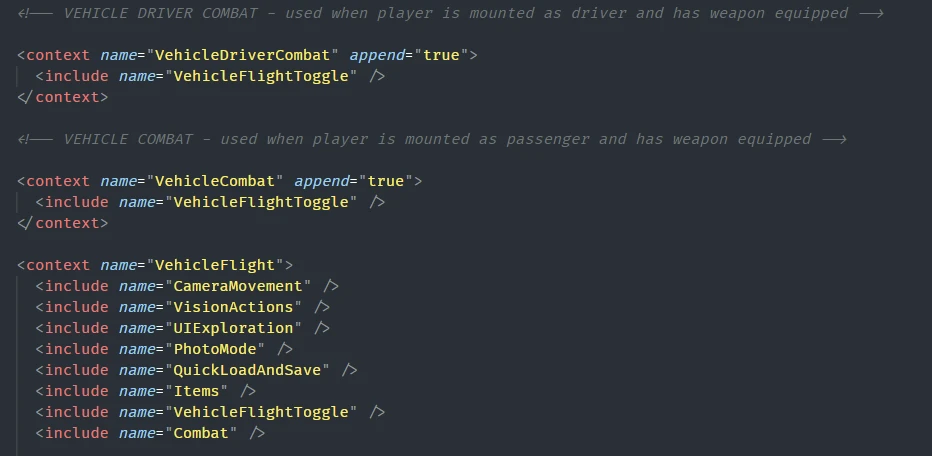
Input Loader is a core framework mod for Cyberpunk 2077 that dynamically merges all custom input XML files from r6/input/*.xml into the game's active input configuration, writing the combined result to r6/cache/ and generating an engine/config/platform/pc/input_loader.ini to manage the process. Players install this because it allows multiple input-rebinding mods (like Cyber Engine Tweaks' bindings or custom hotkey mods) to coexist without overwriting each other's keybinds, ensuring that custom actions like "Scan" or "Quickhack" shortcuts remain functional after updates or mod additions.
📦 Full mod page on discovermods
Downloads, ratings, compatibility info, installation guides, and user reviews.
View on discovermods →Syntax
UtilitiesExample
Downloads: 4,800,854 | Endorsements: 59,814💡 Notes
By Jack Humbert | v0.2.3 | 59,814 endorsements
🎯 Tips & Tricks
Open r6/config/input_loader.ini with a text editor, set 'DebugLog=1' under [General], then launch the game. Check r6/cache/input_loader.log to see which XML files are merged and if any duplicate bindings are overridden. This helps identify why a specific keybind isn't working.
After modifying any file in r6/input/, delete the entire r6/cache/ folder (not just input_loader.log) before launching the game. This forces Input Loader to re-parse all XMLs and regenerate the merged config, preventing stale bindings from persisting.
When adding a new keybind, create a file in r6/input/ with the exact structure: <root><Mappings><Mapping name="MyAction" type="Button"><button id="IK_P" /></Mapping></Mappings></root>. Refer to the game's default input.xml in r6/config/ for valid button IDs like IK_J for journal, IK_T for scanner. Incorrect IDs cause the action to silently fail.
🔧 Troubleshooting
Input Loader conflicts with Cyber Engine Tweaks (CET) when both try to bind the same key (e.g., F5 for quicksave)
In CET's bindings.ini (located in bin/x64/plugins/cyber_engine_tweaks/), remove any duplicate keybind that overlaps with your Input Loader XML. Alternatively, set 'AllowInputOverrides' to false in Input Loader's ini to let CET take priority, but then you lose Input Loader's merging for that key.
After installing a new input mod like 'Custom Hotkeys' or 'Quickhack Hotkeys', the game crashes at startup with an error about duplicate input mappings
Check if the mod's XML uses a namespace or mapping name that conflicts with base game files. Open the mod's XML in r6/input/ and rename any mapping with 'name="Action"' to something unique like 'ActionModName'. Also ensure the XML version matches the game's current patch (e.g., 2.1), as old schemas cause parse errors.
⚠️ Common Mistakes
- [object Object]
- [object Object]
👍 Pros
- 59,814 endorsements
- 4,800,854 downloads
- Category: Utilities
👎 Cons
- Requires mod manager installation
- May conflict with similar mods