Script Merger
witcher-3 — Mods & Enhancements
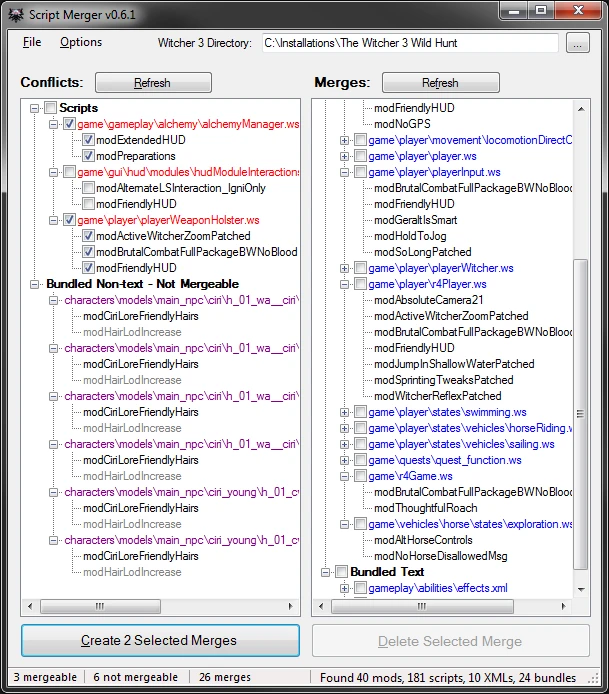
Script Merger is an essential tool for any Witcher 3 modder, as it automatically detects conflicting scripts between mods (like two mods both editing the 'player.ws' file) and creates a merged file that combines the changes without breaking the game. It provides a visual diff interface where you can manually choose which lines from which mod to keep, and it also handles XML and other non-script conflicts. Players install it to resolve the infamous 'redscript compilation error' that crashes the game on startup, allowing them to run dozens of gameplay overhauls simultaneously.
📦 Full mod page on discovermods
Downloads, ratings, compatibility info, installation guides, and user reviews.
View on discovermods →Syntax
UtilitiesExample
Downloads: 3,056,396 | Endorsements: 103,372💡 Notes
By AnotherSymbiote | v0.6.4 | 103,372 endorsements
🎯 Tips & Tricks
When Script Merger shows a conflict with more than 3 mods (e.g., 'Ghost Mode', 'W3EE', and 'Enhanced Targeting' all editing the same combat function), don't use 'Auto'. Click 'Manual', then in the left panel, select the function from the oldest mod (e.g., Ghost Mode). In the right panel, right-click the conflicting line and choose 'Add to merge from this mod' for each mod's unique addition. This preserves all features.
If you have 'All Quest Objectives On Map' and 'Colored Map Markers', they both edit 'minimap.ws' and XML files. In Script Merger, after merging scripts, check the 'XML' tab at the bottom. For each XML conflict, select 'Merge' and then in the preview, keep the 'objective' entries from the quest mod and the 'marker' entries from the colored mod. This prevents map icons from disappearing.
Before adding a new mod, go to your 'The Witcher 3/mods' folder and copy the 'mod_scripts_merged' folder to your desktop. Script Merger overwrites this folder every time you run it. If the new mod's scripts break the merge, you can delete the new mod and paste back the old 'mod_scripts_merged' folder to instantly revert to a stable state.
🔧 Troubleshooting
Script Merger crashes when loading 'Witcher 3 Enhanced Edition' (W3EE) because of its huge script size
This is a known memory issue. Open Script Merger's launcher, go to 'Settings' > 'Java', and increase the 'Max Heap Size' from 512MB to 2048MB. If it still crashes, run Script Merger as Administrator and disable any antivirus real-time scanning on the mods folder, as the tool reads thousands of files at once.
Merged scripts cause infinite loading screen when used with 'Friendly HUD' and 'Immersive Cam'
These two mods both edit the 'input.ws' for camera controls, and a bad merge can cause a deadlock. In Script Merger, find the conflict for 'handlePlayerInput'. Manually choose the entire block from 'Immersive Cam' for the camera keys, and from 'Friendly HUD' for the HUD toggle keys. Do not mix lines within the same if-else block.
⚠️ Common Mistakes
- [object Object]
- [object Object]
👍 Pros
- 103,372 endorsements
- 3,056,396 downloads
- Category: Utilities
👎 Cons
- Requires mod manager installation
- May conflict with similar mods