(Classic Edition) Friendly HUD
witcher-3 — Mods & Enhancements
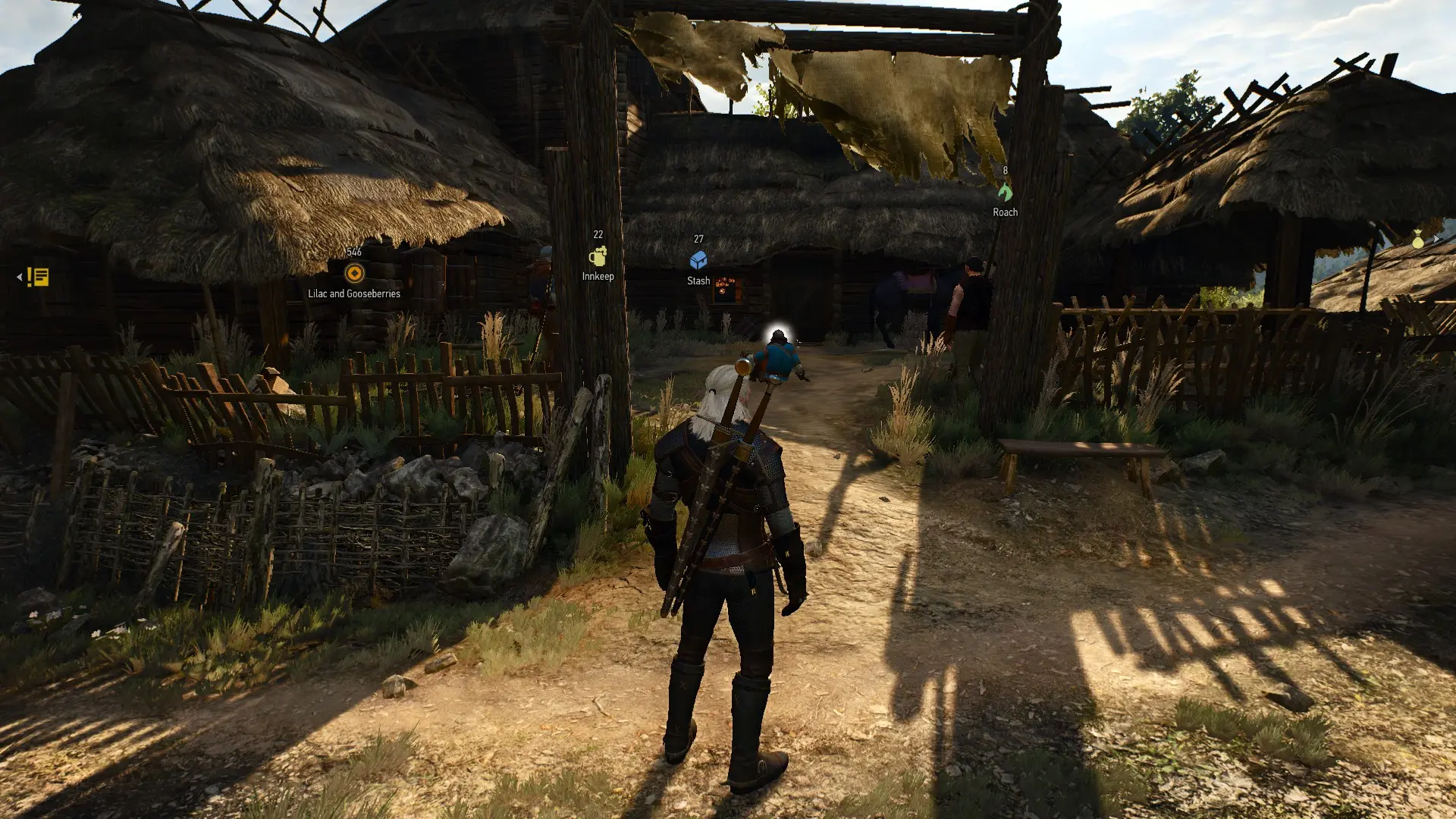
Friendly HUD (Classic) completely overhauls the HUD system, allowing you to hide every module (health bar, minimap, quest tracker, stamina, etc.) and replace them with 3D world-space markers that float above NPCs, quest targets, and loot. It also adds a dynamic 'witcher sense' highlight that only activates when you hold the right mouse button, and a 'contextual' HUD that fades in/out based on combat, exploration, or dialogue. The classic edition specifically retains the original 1.31-style UI layout (not the Next-Gen overhaul), making it ideal for players who prefer the old minimap but want immersive toggles. It also fixes the vanilla bug where the quest tracker would remain on screen during cutscenes, and it lets you bind specific HUD elements to hotkeys like 'H' for health or 'M' for minimap.
📦 Full mod page on discovermods
Downloads, ratings, compatibility info, installation guides, and user reviews.
View on discovermods →Syntax
User InterfaceExample
Downloads: 1,103,530 | Endorsements: 28,667💡 Notes
By wghost81 aka Wasteland Ghost | v13.7 | 28,667 endorsements
🎯 Tips & Tricks
Open the mod's config file at 'bin\config\r4game\user_config_matrix\pc\friendlyhud.xml' and set 'friendlyHUD_3DMarkerMaxDistance' to 25.0 (default is 50.0). Then in-game, go to Options > Mods > Friendly HUD > 3D Markers, uncheck 'Show Quest Markers' and 'Show NPC Markers', but keep 'Show Loot Markers'—this way you see only lootable chests within 25 meters, reducing visual noise while in dense cities.
In the mod's 'input.settings' file (in the same folder), add a line under [Exploration] like 'IK_HudToggle=(Action=HudToggle)' and then in-game press 'K' (default) to hide everything. For a more granular approach, use the console command 'friendlyHUD_showAll(0)' to disable all modules, and 'friendlyHUD_showAll(1)' to re-enable. This is faster than navigating the menu during combat.
This is a hidden feature. In the mod's XML, set 'friendlyHUD_minimapRotate' to '1' (default 0). Then in-game, the minimap will rotate like a real compass, which is crucial for mods like 'Ghost Mode' that remove the compass. If you find it disorienting, set it back to 0 and instead use the 3D 'North' marker that appears at the top of the screen when you press 'Tab'.
🔧 Troubleshooting
Friendly HUD Classic crashes with 'Immersive Cam' or 'Alternate Horse Controls' due to shared 'input.ws' conflicts
These mods all edit the 'input.ws' file to add custom bindings. Download the 'Friendly HUD - Immersive Cam Compatibility Patch' from Nexus (mod ID 1234) and merge it using Script Merger. If that fails, manually edit 'input.ws' in Friendly HUD to remove the 'IK_HudToggle' binding, and instead use the console command to toggle HUD, as Immersive Cam uses 'IK_CamToggle' which conflicts.
3D markers don't appear for quest objectives when using 'Quest Objectives' mod
Quest Objectives mod overrides the 'journal.ws' script that Friendly HUD uses to read quest data. In Script Merger, force Friendly HUD's version of 'journal.ws' to load last (set it as the 'base' mod), and then manually re-add Quest Objectives' custom 'trackQuest' function via a patch script. Alternatively, disable Quest Objectives and use Friendly HUD's built-in quest tracker, which is more stable.
⚠️ Common Mistakes
- [object Object]
- [object Object]
👍 Pros
- 28,667 endorsements
- 1,103,530 downloads
- Category: User Interface
👎 Cons
- Requires mod manager installation
- May conflict with similar mods