Who's High Res Wizard Portrait and Sprites
stardew-valley — Mods & Enhancements
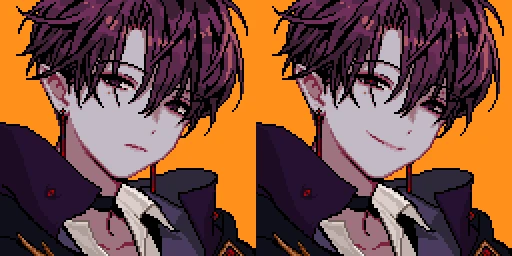
This mod replaces the default wizard portrait and character sprites with high-resolution versions, requiring SMAPI, Portraiture, and Content Patcher. It's a popular cosmetic enhancement for Stardew Valley players who want a crisper look for the wizard, with over 7,800 endorsements and 313,000 downloads.
📦 Full mod page on discovermods
Downloads, ratings, compatibility info, installation guides, and user reviews.
View on discovermods →Syntax
PortraitsExample
Downloads: 313,686 | Endorsements: 7,861💡 Notes
By Who_M | v1.0.2 | 7,861 endorsements
🎯 Tips & Tricks
Make sure you have SMAPI installed first—it's the backbone for all mods, and you'll need to launch the game through SMAPI for this to work.
Portraiture is a framework that lets you swap portraits in-game; you'll need to place the mod's files in the right folder (usually Mods/Portraiture/Portraits) for the portrait to show up.
Content Patcher handles the sprite replacement, so double-check that it's updated to the latest version to avoid conflicts with other mods.
🔧 Troubleshooting
Mod not working
Check load order and required dependencies. Read the full mod description.
⚠️ Common Mistakes
- Installing multiple mods that modify the same files without checking compatibility
👍 Pros
- Huge community trust with 7,861 endorsements and over 313k downloads
- Simple cosmetic upgrade that makes the wizard look sharper without changing gameplay
- Actively maintained, last updated in March 2024
👎 Cons
- Requires three separate mods (SMAPI, Portraiture, Content Patcher) just to run
- Only affects the wizard character—if you want high-res for other NPCs, this won't help
- No detailed feature list or screenshots in the description, so you're flying blind on the visual changes