Better Artisan Good Icons
stardew-valley — Mods & Enhancements
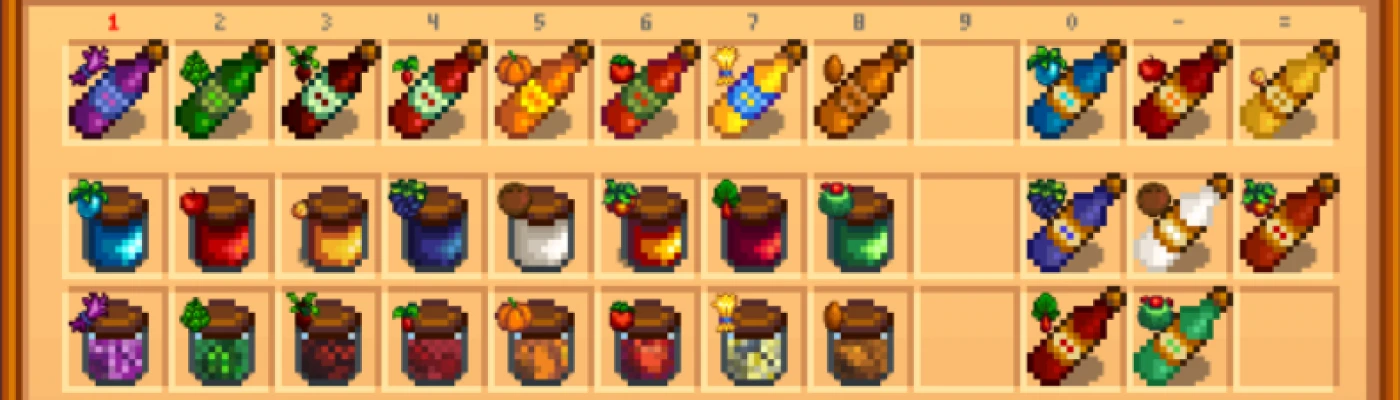
Better Artisan Good Icons replaces the generic icons for jelly, pickles, wine, juice, and honey with icons based on the fruit, vegetable, or flower used to make them. This quality-of-life UI mod helps players identify their artisan goods at a glance, with an option to hide the small icons. It has 41,909 endorsements and 1.3 million downloads, last updated in March 2019.
📦 Full mod page on discovermods
Downloads, ratings, compatibility info, installation guides, and user reviews.
View on discovermods →Syntax
User InterfaceExample
Downloads: 1,260,230 | Endorsements: 41,909💡 Notes
By Cat | v1.5.0 | 41,909 endorsements
🎯 Tips & Tricks
If you're using SMAPI, just drop the mod folder into your Mods directory — no extra config needed.
Check the mod's page for any optional settings to hide the small icons if you find them cluttering.
Since it's from 2019, test it on your current game version; if it breaks, look for a community patch or alternative.
🔧 Troubleshooting
Mod not working
Check load order and required dependencies. Read the full mod description.
⚠️ Common Mistakes
- Installing multiple mods that modify the same files without checking compatibility
👍 Pros
- Massive community approval (41,909 endorsements) — this is a must-have for Stardew players.
- Saves you from hovering over every jar to check what's inside — a real time-saver.
- Simple, clean UI improvement that fits right into the game's aesthetic.
👎 Cons
- Last updated in 2019 — might not be compatible with the latest Stardew Valley updates (1.6+).
- No install instructions provided by the author, so you'll need to figure out the mod manager setup yourself.
- Only affects artisan goods icons — if you wanted more UI overhauls, this is a one-trick pony.