Categorized Favorites Menu
skyrim — Mods & Enhancements
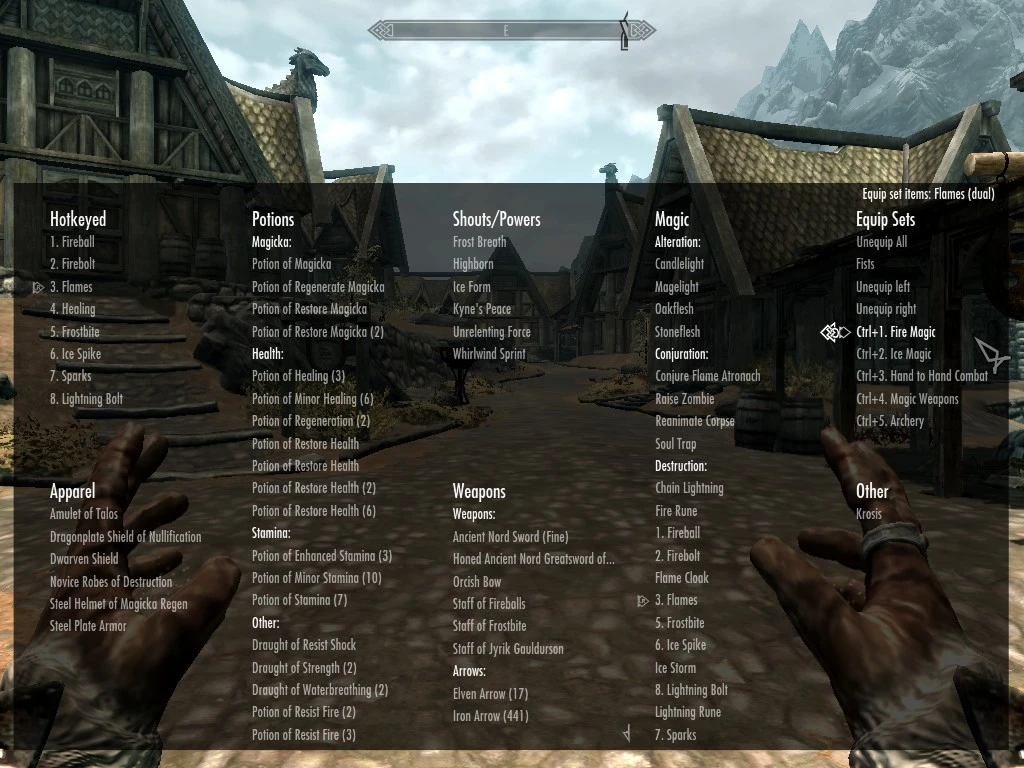
Categorized Favorites Menu replaces Skyrim's single favorites list with organized submenus by category. With 55,119 endorsements and 2.0M downloads, it's a proven UI overhaul for players who want quicker access to items. Last updated in 2013, it remains a staple for many modded setups.
📦 Full mod page on discovermods
Downloads, ratings, compatibility info, installation guides, and user reviews.
View on discovermods →Syntax
User InterfaceExample
Downloads: 1,979,613 | Endorsements: 55,119💡 Notes
By favmenumodder | v0.1.18 | 55,119 endorsements
🎯 Tips & Tricks
Make sure to install SKSE first — most Skyrim UI mods depend on it, even if not listed.
After installing, sort your favorites into categories via the in-game menu to get the full benefit.
If you're on Skyrim Special Edition, check for a compatible version or use a mod manager to handle conflicts.
🔧 Troubleshooting
Mod not working
Check load order and required dependencies. Read the full mod description.
⚠️ Common Mistakes
- Installing multiple mods that modify the same files without checking compatibility
👍 Pros
- Massive community approval (55,119 endorsements) — this is a must-have for UI modders.
- 2.0M downloads show it's been battle-tested by thousands of players.
- Simple concept, huge quality-of-life improvement for inventory management.
👎 Cons
- Last updated in 2013 — may not be compatible with the latest Skyrim Special Edition or Anniversary Edition without patches.
- No detailed feature list provided — you'll have to discover the exact categories in-game.
- Requires Skyrim Script Extender (SKSE) for full functionality, though not explicitly stated here.