Dark UI
oblivion — Mods & Enhancements
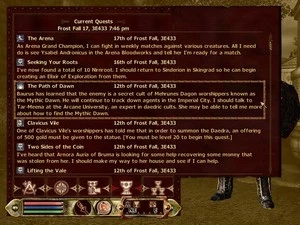
Dark UI is a user interface overhaul for Oblivion that darkens menus and retextures container and book backgrounds. With 1,661 endorsements and 73,294 downloads, it's a well-established cosmetic mod. Last updated in 2008, it may not be compatible with newer patches or mods.
📦 Full mod page on discovermods
Downloads, ratings, compatibility info, installation guides, and user reviews.
View on discovermods →Syntax
User InterfacesExample
Downloads: 73,294 | Endorsements: 1,661💡 Notes
By Greybird | v2dot40 | 1,661 endorsements
🎯 Tips & Tricks
Since it's an old mod, manually place the files into your Oblivion Data folder and ensure you have Archive Invalidation enabled.
If you use a mod manager like OBMM or Wrye Bash, install it through that to manage conflicts with other UI mods.
Test with a save before a merchant interaction to see the container menu changes.
🔧 Troubleshooting
Mod not working
Check load order and required dependencies. Read the full mod description.
⚠️ Common Mistakes
- Installing multiple mods that modify the same files without checking compatibility
👍 Pros
- Community favorite with 1,661 endorsements and over 73k downloads.
- Subtle dark theme that's easy on the eyes for long play sessions.
- Fixes popup display and line neatness in container menus.
👎 Cons
- Last updated in 2008 — likely outdated for current Oblivion versions and mod setups.
- Only touches container and book/scroll menus; other UI elements remain unchanged.
- No install instructions or compatibility notes provided by the author.