Tamriel in Minecraft
minecraft — Mods & Enhancements
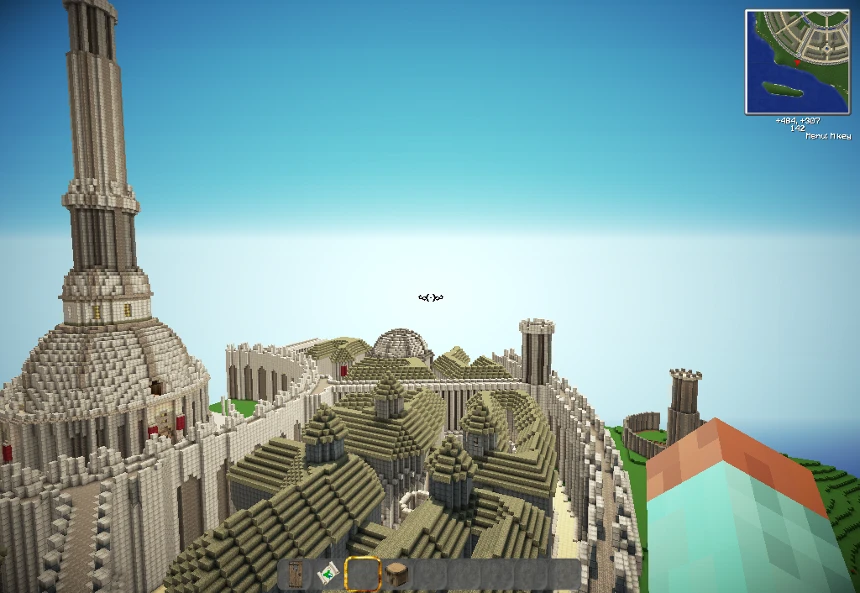
This mod adds a full-scale, explorable world of Tamriel from The Elder Scrolls, including the provinces of Skyrim, Cyrodiil, Morrowind, and more, with custom biomes, dungeons, villages, and NPCs based on lore. It replaces the vanilla Overworld dimension with a 1:1 scale map of Tamriel, complete with iconic locations like White Run, the Imperial City, and Vvardenfell's ashlands, along with new blocks, mobs, and quests. Players install it to experience a massive open-world RPG adventure inside Minecraft, blending Elder Scrolls lore with Minecraft's building and survival mechanics.
Syntax
ArmourExample
Downloads: 10,364💡 Notes
By Iceburg
🎯 Tips & Tricks
Before exploring, run the command '/pregen radius 5000' using the Chunk Pregenerator mod (if installed) or set 'generate-structures=true' in server.properties. Tamriel's custom biome generation is heavy—pre-generating chunks in a 5000-block radius around spawn prevents stutter when traveling from Skyrim to Cyrodiil.
In each major city (e.g., Whiterun, Imperial City), locate the Mages Guild building and right-click the blue crystal. This teleports you to any other guild's crystal, but only if you've activated that crystal first. Use the command '/tamriel teleport <city>' as an admin alternative for quick testing.
When creating a new world, select 'World Type: Tamriel' in the world creation screen (not the default 'Default' type). If you use a custom world preset, add 'tamriel:biome' to the 'biome_source' section, otherwise you'll get vanilla terrain with Tamriel structures scattered randomly.
🔧 Troubleshooting
Crash when entering the Nether or End because Tamriel replaces the Overworld dimension ID (0), causing conflicts with 'Twilight Forest' or 'The Aether' mods
In the Tamriel mod config file (config/tamriel.cfg), set 'dimensionID=2' instead of the default 0. This moves Tamriel to a custom dimension slot, leaving the Overworld untouched. Then restart your game and create a new world—existing worlds won't work unless you use an external tool like NBTExplorer to change the dimension ID.
Black screen with fog everywhere when using 'Optifine' with shaders (e.g., SEUS) because Tamriel's custom skybox conflicts with shader fog rendering
In Optifine's shader settings, set 'Fog: Off' or switch to 'Internal Shaders' (Options > Video Settings > Shaders > Shader Options > Fog: OFF). Alternatively, use the 'Complementary Shaders' pack which has a specific fix for Tamriel's sky—download the 'Tamriel Shader Patch' from CurseForge and place it in the shaderpack's 'shaders' folder.
⚠️ Common Mistakes
- Players often install this mod on an existing vanilla world, which corrupts the terrain because Tamriel replaces the Overworld generator. Always create a new world with the 'Tamriel' world type—never load an old save.
- Using 'Minecraft Comes Alive' or 'Villager Trading' mods alongside Tamriel breaks the custom NPC dialogues, because Tamriel uses its own NPC system with unique entity IDs. Remove those mods or use the included 'Tamriel Compatibility Patch' from the mod's official page.
👍 Pros
- 706 endorsements
👎 Cons
- Requires correct game version