Improved Map with Visible Roads
fallout-4 — Mods & Enhancements
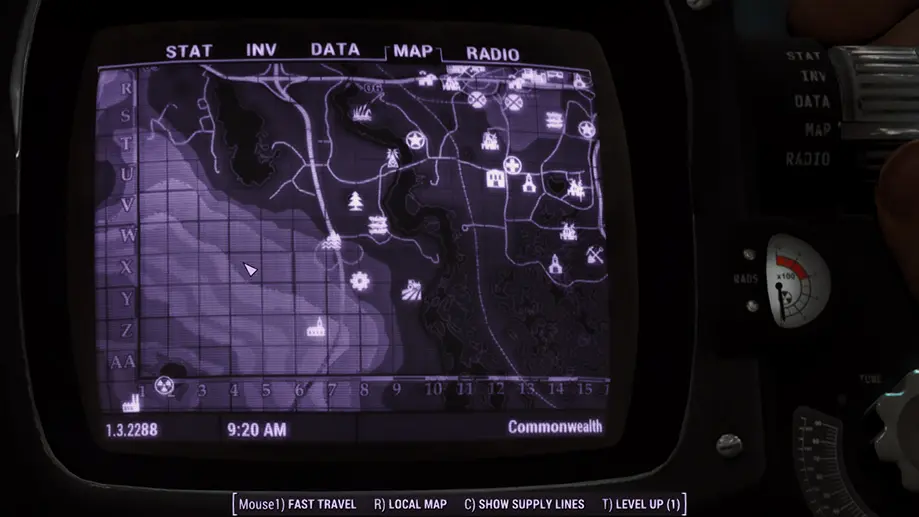
This mod replaces the vanilla world map texture with a high-contrast, detailed version that makes roads, rivers, and topographic contour lines clearly visible, solving the common issue of getting lost in the Commonwealth's foggy default map. It also includes an optional numbered grid overlay and region labels (e.g., 'The Glowing Sea', 'Quincy') for easier navigation and fast-travel destination planning. Players install it for better situational awareness and to make manual exploration less frustrating, especially in areas like the northern forests or the downtown ruins.
📦 Full mod page on discovermods
Downloads, ratings, compatibility info, installation guides, and user reviews.
View on discovermods →Syntax
Models and TexturesExample
Downloads: 5,508,444 | Endorsements: 138,229💡 Notes
By mm137 | v2.0 | 138,229 endorsements
🎯 Tips & Tricks
After installing, open the mod's files in your Data folder and find the 'Grid' folder. Copy the 'MapGrid.dds' file over the main 'Map.dds' (backup the original). This adds a 1-10 grid (horizontal and vertical) onto the map. Use these coordinates in console commands or when describing locations (e.g., 'Grid 7, row 4' for Diamond City). This is especially useful for roleplay or when using the 'Map Marker' mod to set custom fast-travel points.
The mod's default map can be too bright in snowy areas. Open the mod's 'FOMOD' or 'Textures' folder, find 'Map.dds', and use a DDS editor (like GIMP with DDS plugin) to reduce the alpha channel by 20%. Alternatively, use the 'Map Menu' mod (if you have it) to adjust map opacity in-game via its MCM settings. This helps see the Pip-Boy's green overlay without losing road details.
If you use 'Immersive Fast Travel' (which disables fast travel), this map becomes essential. Set your Pip-Boy map to 'World Map' and use the visible road lines to plan a route via major highways (e.g., Route 1 from Sanctuary to the Castle). This makes manual travel more realistic and prevents getting stuck on cliffs or in water.
🔧 Troubleshooting
Conflict with 'Pip-Boy Shading Fix' or 'Map Markers' mods causing the map to appear blurry or the grid to disappear
Load this mod's ESP (or texture override) AFTER any map-related mods in your load order. If using 'Pip-Boy Shading Fix', edit its INI to disable its map texture override, or install 'Improved Map with Visible Roads - No Grid' version and manually place the grid texture in the 'Textures/Interface' folder. For 'Map Markers', ensure you don't have two 'Map.dds' files conflicting; use the mod's 'Compatibility' option in the FOMOD to install only the map texture, not the ESP.
The map doesn't show the numbered grid after installing the optional grid file
The grid is a separate DDS file that must be placed in the correct directory. After extracting the mod, navigate to 'Textures/Interface/Map' and replace 'Map.dds' with 'MapGrid.dds' (rename it). If the grid still doesn't appear, your game may have a corrupted texture cache. Delete the 'Textures' folder in your 'Documents/My Games/Fallout4' directory (backup first) and let the game rebuild.
⚠️ Common Mistakes
- [object Object]
- [object Object]
👍 Pros
- 138,229 endorsements
- 5,508,444 downloads
- Category: Models and Textures
👎 Cons
- Requires mod manager installation
- May conflict with similar mods