FallUI - Workbench
fallout-4 — Mods & Enhancements
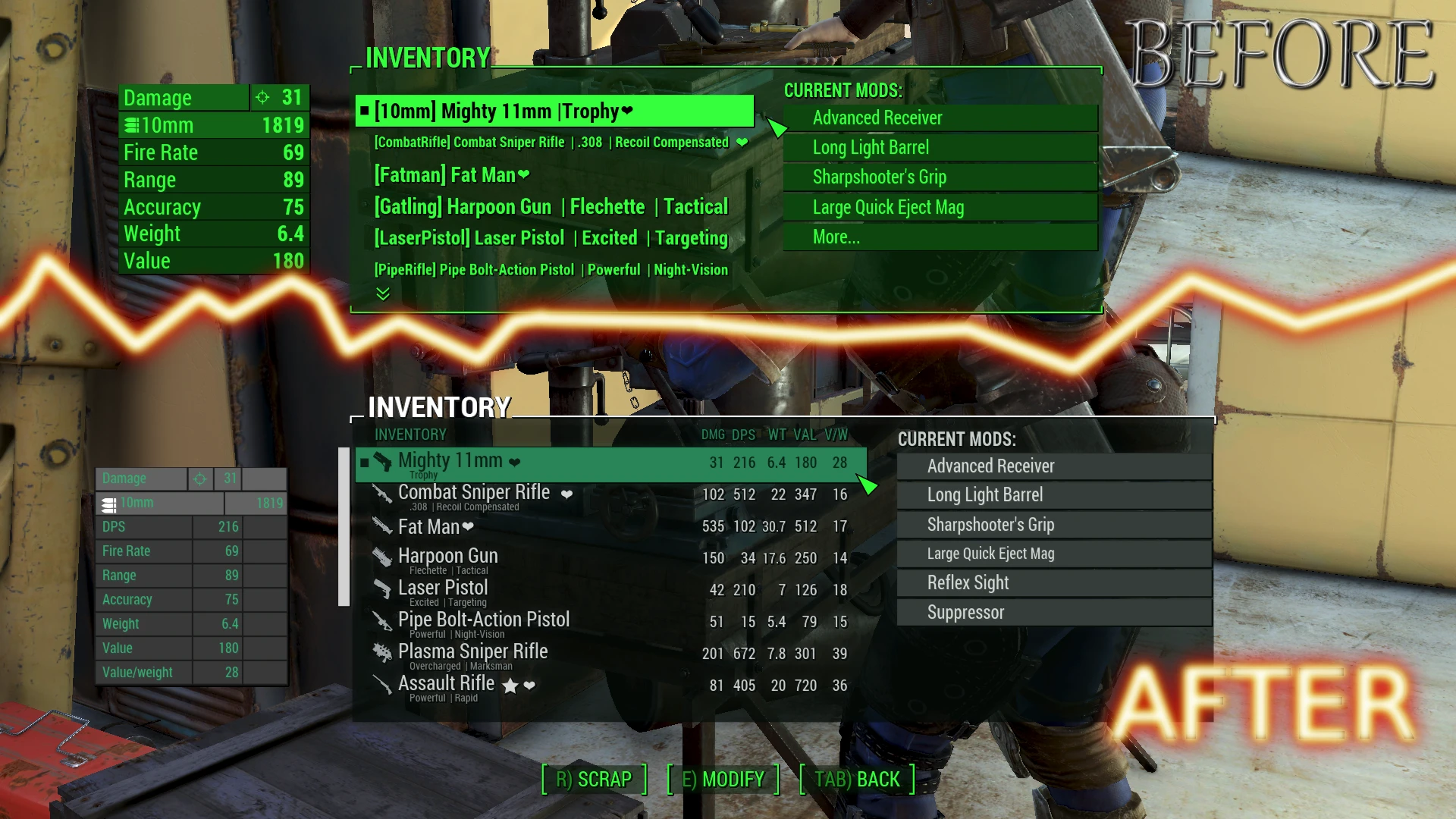
FallUI - Workbench overhauls the Fallout 4 workbench interface for PC, offering a larger display, data and comparison columns for mods, item icon tags, an icon menu, item subtitles, and zero-cost autobuilding modules. It supports all languages and has a strong community following with over 20,000 endorsements.
📦 Full mod page on discovermods
Downloads, ratings, compatibility info, installation guides, and user reviews.
View on discovermods →Syntax
User InterfaceExample
Downloads: 2,164,797 | Endorsements: 20,276💡 Notes
By m8r98a4f2 | v1.4.1-r2 | 20,276 endorsements
🎯 Tips & Tricks
Since it's a UI mod, install it with a mod manager like Vortex or Mod Organizer 2 to keep your load order clean.
If you use other UI mods, place FallUI - Workbench after them in your load order to ensure its features take priority.
The zero-cost autobuilding is a great way to test out modded weapons and armor without burning resources—use it to experiment.
🔧 Troubleshooting
Mod not working
Check load order and required dependencies. Read the full mod description.
⚠️ Common Mistakes
- Installing multiple mods that modify the same files without checking compatibility
👍 Pros
- Huge community trust with 20,276 endorsements and 2.2M downloads
- Packed with features: comparison columns, icon tags, and zero-cost autobuilding
- Multilingual support means it works for everyone
👎 Cons
- Last updated in 2022, so it might not be fully compatible with the latest game patches
- UI overhauls can be a matter of taste—some might find the new layout cluttered
- No explicit mention of compatibility with other UI mods, so conflicts could arise