Less Wrinkled Expression and Forehead for Face
baldurs-gate-3 — Mods & Enhancements
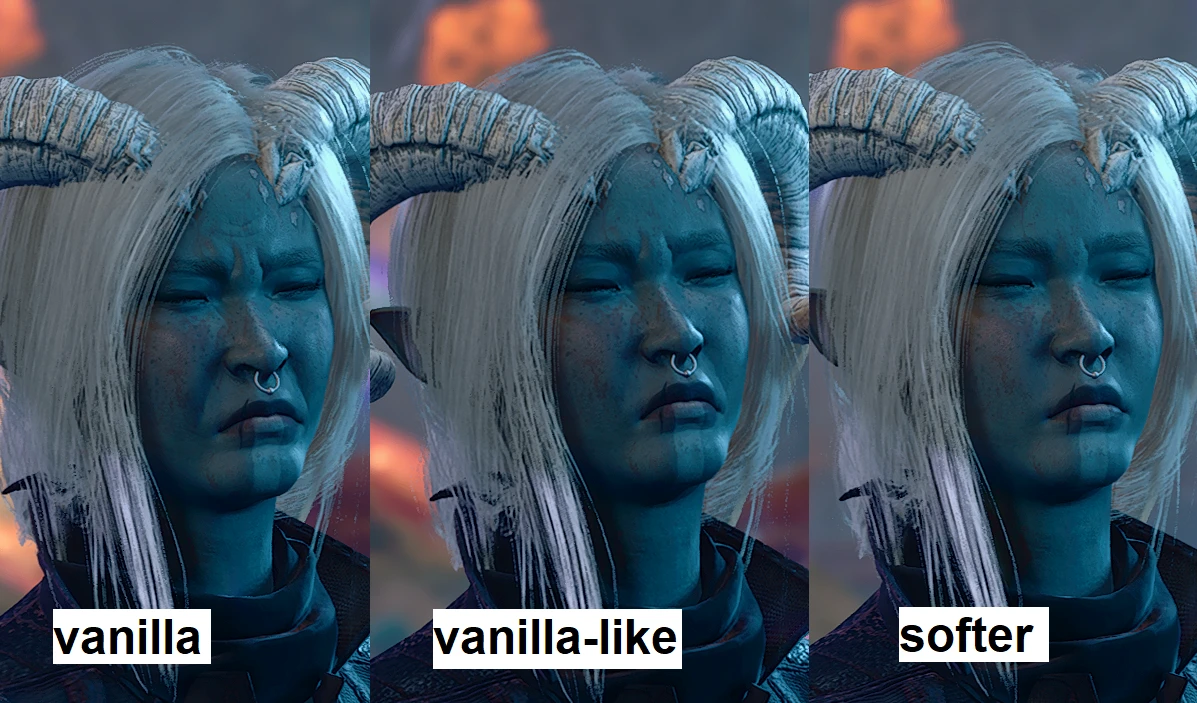
This mod directly edits the normal map and wrinkle overlay textures used in the character creation and in-game face meshes for human, half-elf, and elf female heads, reducing the deep frown lines and forehead creases that appear during dialogue and idle animations. It also applies a subtle smoothing to the nasolabial folds and glabella area, making expressions like 'Angry' and 'Sad' look less exaggerated while preserving lip and eye movement. Players install it to get a more youthful, serene appearance for their Tav or Origin characters without altering the underlying head shape, which keeps compatibility with face replacers like 'New Character Creation Presets' or 'Faces of Faerûn'.
📦 Full mod page on discovermods
Downloads, ratings, compatibility info, installation guides, and user reviews.
View on discovermods →Syntax
VisualsExample
Downloads: 1,190,819 | Endorsements: 15,314💡 Notes
By commanderstrawberry | v1 | 15,314 endorsements
🎯 Tips & Tricks
In Vortex, set this mod's 'Mod Type' to 'Override' and place it ABOVE 'Subtle Eyes' or 'EotB Face Textures' in the 'Mods' tab. If you use BG3 Mod Manager, drag this mod to the top of the load order (highest priority) so its .dds files overwrite the base game's 'LST_Head_F_N_Human.dds' and 'LST_Head_F_N_HalfElf.dds'. This ensures the wrinkle reduction takes effect over any other texture mods.
If the smoothing is too strong, open the mod's .pak with 'BG3 Pak Extractor' and navigate to 'Public/Shared/Assets/Textures/Characters/Heads'. Find the files named 'LST_Head_F_N_Human_NM.dds' (normal map) and 'LST_Head_F_N_Human_WR.dds' (wrinkle map). Use GIMP with the 'DDS' plugin to reduce the alpha channel's opacity on the wrinkle map by 30% and re-export as BC7. This gives you fine control over forehead crease depth.
After installing this mod, launch the game, load into a save, then open the Character Sheet (C key) and toggle the 'Helmet' visibility off and on. This forces the game to re-apply the material overrides. If you don't see a change, verify the mod is active in the 'Mods' menu and that you've selected a face that uses the standard human/half-elf head mesh—this mod does not affect dwarves, gnomes, or halflings.
🔧 Troubleshooting
Conflict with 'Tav's Hair Salon' mod which replaces the entire face texture set
Tav's Hair Salon includes its own .dds files for the head, overriding this mod. To fix, in Vortex, create a 'Conflict Override' rule: set 'Less Wrinkled' to 'Load After' Tav's Hair Salon, then manually copy the 'LST_Head_F_N_Human_WR.dds' from this mod into the Tav's Hair Salon folder using 'File Explorer'—this way you keep the hair mod's normal map but get the wrinkle reduction.
In-game characters show black face textures after patch 6
This is caused by a missing 'Material' reference in the mod's .pak after the game updated to patch 6. Download the 'Less Wrinkled Patch 6 Fix' from Nexus (search 'LWE Patch 6'), which updates the .pak to include the new 'LST_Head_F_N_Human_MAT' material file. Replace the original .pak with the fixed one, then re-validate your load order.
⚠️ Common Mistakes
- Installing this mod and then using 'Appearance Edit Enhanced' to change your character's race—the mod only affects human/half-elf/elf female heads, so if you switch to a tiefling or dragonborn, the wrinkles remain, causing a jarring visual mismatch.
- Using the mod with 'Face Unlocker' that enables NPC-only faces like 'Auntie Ethel'—those faces have their own unique wrinkle maps that this mod doesn't touch, so you'll see the original heavy wrinkles on those models, confusing players who expected uniform smoothing.
👍 Pros
- 15,314 endorsements
- 1,190,819 downloads
- Category: Visuals
👎 Cons
- Requires mod manager installation
- May conflict with similar mods