Icon and Race Patches for Tav's Hair Salon
baldurs-gate-3 — Mods & Enhancements
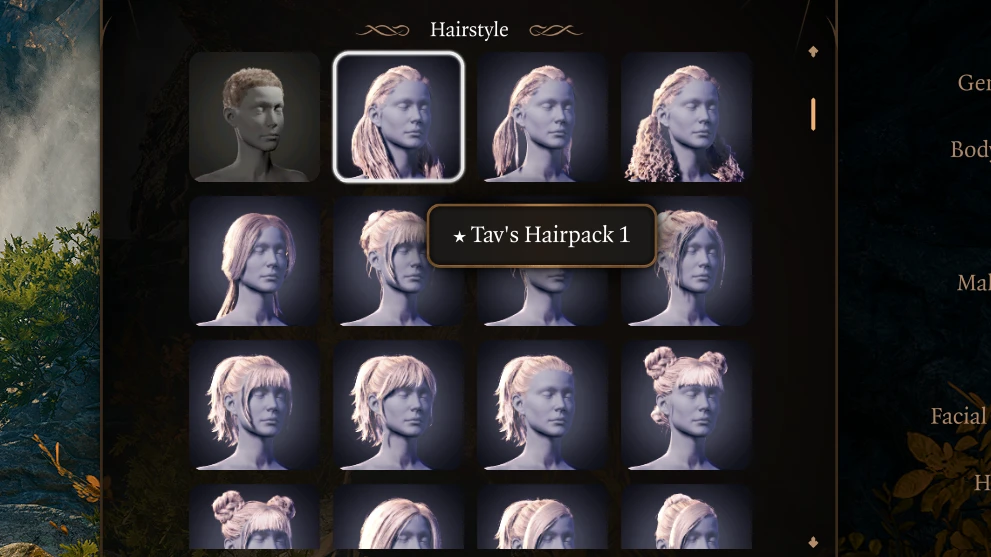
This patch pack integrates Toarie's 'Tav's Hair Salon' (a mod that adds hundreds of custom hairstyles via the Magic Mirror) with the in-game character creation UI by adding proper portrait icons for each hair, so you can see what you're picking instead of a generic placeholder. It also adds compatibility patches for custom race mods like 'Half-Elf Variants' and 'Tiefling+', ensuring that the new hairs don't clip or vanish when applied to non-standard head meshes or body types. Players install this to eliminate the guesswork of scrolling through unnamed hair entries and to fix the common 'bald head' bug that occurs when using race mods with custom head shapes.
📦 Full mod page on discovermods
Downloads, ratings, compatibility info, installation guides, and user reviews.
View on discovermods →Syntax
MiscellaneousExample
Downloads: 1,649,926 | Endorsements: 18,892💡 Notes
By perseidipity | v2.0.0 | 18,892 endorsements
🎯 Tips & Tricks
In Vortex, load this mod AFTER 'Tav's Hair Salon' and AFTER your race mod (e.g., 'Half-Elf Variants' by Toarie). Then, in the 'Mods' tab, drag this mod's .pak files to the bottom of your load order, directly above 'Full Release Mod Fixer' if you have it. This ensures the patch overrides the race mod's head meshes without conflicting with the base game's 'Shared' assets.
If icons don't appear after installing, open the 'Mods' folder in your BG3 data directory (usually 'C:\Program Files (x86)\Steam\steamapps\common\Baldurs Gate 3\Data'), delete the 'Mods' folder's 'Public' subfolder (this is safe—it's just a cache), then launch the game. The game will rebuild the icon cache on the character creation screen. Do NOT delete the .pak files themselves.
If you also use 'Mirror's Edge' (which adds extra Magic Mirror slots), this patch will apply correctly only if you install it AFTER 'Mirror's Edge' in the load order. In the mod manager, set this mod's load priority to 10, and 'Mirror's Edge' to 5, so the patch's 'HairSalon_IconPatch' file overrides the base slot definitions without breaking the extra slots.
🔧 Troubleshooting
Hairs appear as 'Empty' or 'None' in the Magic Mirror when using 'Tav's Hair Salon' + 'Fantastical Multiverse' race mod.
This happens because 'Fantastical Multiverse' (v2.1+) changed the head mesh naming scheme. Download the 'FM_Compatibility_Patch' from the mod's optional files on Nexus, and load it AFTER both this patch and 'Fantastical Multiverse'. Also ensure you're using the latest 'Baldur's Gate 3 Script Extender' (v7+), as the patch relies on its 'UI_ShowTooltip' function for icon display.
Icons show but hair clips through custom horns from 'Horns of Baldur's Gate' mod.
The race patches don't adjust horn collision. Use 'Horns of Baldur's Gate' version 2.0 or later, and in its MCM (Mod Configuration Menu) set 'Horn Collision' to 'Disabled' for the specific horn type. Alternatively, edit the 'HairSalon_IconPatch.lsx' file in this mod using a text editor, find the 'HairCollision' attribute, and set it to 'false' for the problematic hair IDs.
⚠️ Common Mistakes
- Installing this mod before 'Tav's Hair Salon' itself, which causes the patch to overwrite the base mod's files, resulting in the entire hair list disappearing from the Magic Mirror and the game crashing on character creation.
- Using the 'All Races' patch without also installing the corresponding race mod (e.g., 'Dragonborn+' or 'Githyanki+'), which leads to invisible hair meshes on standard races because the patch references head slots that don't exist in the base game.
👍 Pros
- 18,892 endorsements
- 1,649,926 downloads
- Category: Miscellaneous
👎 Cons
- Requires mod manager installation
- May conflict with similar mods