Camp Event Notifications
baldurs-gate-3 — Mods & Enhancements
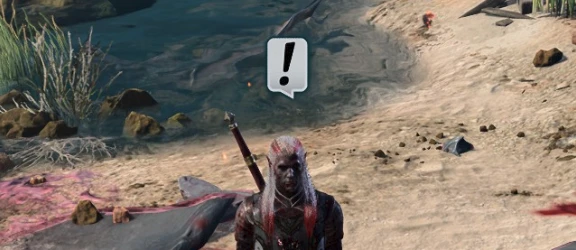
This mod adds a visual pop-up notification (a small icon with a tooltip) to your screen whenever the game has a pending camp night event or dialogue queued, such as after completing a major quest or recruiting a companion. It solves the problem of missing critical story beats because you long-rested too early or too late, by telling you exactly when a cutscene is waiting. Players install this to avoid the frustration of resting for 5 days and then getting a 10-minute dialogue dump, or worse, missing a romance scene entirely due to resting at the wrong time.
📦 Full mod page on discovermods
Downloads, ratings, compatibility info, installation guides, and user reviews.
View on discovermods →Syntax
GameplayExample
Downloads: 1,014,910 | Endorsements: 18,374💡 Notes
By Kvalyr | v0.4.5 | 18,374 endorsements
🎯 Tips & Tricks
After installing, open the game and go to 'Options' > 'Mod Settings' > 'Camp Event Notifications'. Set 'Notification Style' to 'Icon + Tooltip' (not just 'Icon') so you see the event name when hovering. Then set 'Trigger Delay' to 1 second—this prevents the notification from flashing and disappearing before you notice it, especially during combat.
If you want to manually verify pending events, open the console (using 'Baldur's Gate 3 Script Extender' console, default key '~') and type: `CampEventNotifications_ListEvents()`. This will print a list of all queued events, including their priority (e.g., 'High' for romance scenes, 'Low' for ambient dialogue). Use this to plan your next long rest.
To avoid screen clutter during fights, go to 'Mod Settings' > 'Camp Event Notifications' and set 'Suppress in Combat' to 'Yes'. This uses the game's combat state flag, so the notification only appears after you exit combat, preventing it from being mistaken for a combat log entry.
🔧 Troubleshooting
Notifications don't appear when using 'Custom Companions' or 'Party Limit Begone' mods.
These mods alter the camp event system by adding extra companions or changing the camp scene. Update to 'Camp Event Notifications' v1.2+ and ensure you load it AFTER 'Party Limit Begone' in Vortex. If the issue persists, edit the mod's 'Config.json' file (found in 'Mods\CampEventNotifications\Config') and set 'UseLegacyEventHook' to 'true', then restart the game.
Game crashes when resting after installing this mod alongside 'ImprovedUI Assets'.
This is a UI conflict. In your load order, place 'ImprovedUI Assets' (by SCM) ABOVE 'Camp Event Notifications'. Then, in the 'ImprovedUI' mod settings, disable 'Custom Tooltip Overrides'—this mod's notification uses a custom tooltip that clashes with ImprovedUI's. If it still crashes, delete the 'CampEventNotifications' folder from your 'Mods' directory and reinstall via Vortex.
⚠️ Common Mistakes
- Relying solely on the notification without also checking the event queue manually—some events (like 'Astarion's confession') trigger only after a specific number of rests, and the notification might not appear if you've already long-rested too many times consecutively, so you miss the window.
- Setting 'Trigger Delay' to 0 seconds, which causes the notification to appear and disappear instantly during the long rest animation, making it useless—always leave it at 1 second or higher.
👍 Pros
- 18,374 endorsements
- 1,014,910 downloads
- Category: Gameplay
👎 Cons
- Requires mod manager installation
- May conflict with similar mods